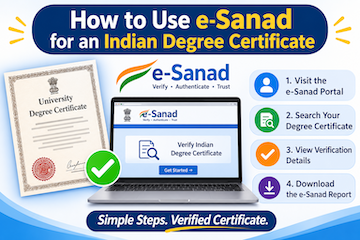
You can use e-Sanad for an Indian degree certificate only if the required record is available in a digital repository. Check your university and certificate first, then choose apostille or attestation according to your destination and the recipient’s requirements.
Can Your Degree Use e-Sanad?
Not every Indian degree certificate is eligible for e-Sanad. For an e-Sanad degree certificate apostille or attestation, start by checking the exact certificate, its issuing authority and the verification route:
- Check the degree and issuer. Find the university or other Document Issuing Authority (DIA) on the e-Sanad portal. The portal publishes a list of integrated authorities; confirm current coverage with your institution.
- Check the record. e-Sanad says the document must be available in a digital repository for its attestation or apostille service. Ask your university whether your particular degree record is available for this purpose and whether it is lodged in the National Academic Depository (NAD).
- Check pre-authentication. Ask the university and the relevant state authority what authentication applies to your certificate and whether it is part of the portal route.
- If the record or issuer cannot be found, confirm before paying. Ask the university to check the record and contact e-Sanad support. If the degree is not available in a digital repository, the MEA describes a physical alternative, explained below.
The e-Sanad portal says the project was designed for integration with DigiLocker and other depositories. If your record is shown as pre-verified or fetchable, ask e-Sanad and your university how to select it and whether any further authentication is needed.
Choose Apostille or Normal Attestation
The Ministry of External Affairs (MEA), Government of India, apostilles educational documents including degrees. An apostille is used for a destination where the Hague Apostille Convention applies; normal MEA attestation is used where an apostille is not accepted.
Before choosing, check both the destination’s Convention status and whether the Convention applies between India and that destination. Consult the Hague Conference on Private International Law (HCCH) status table for membership and objections. Ask the receiving university, employer or immigration authority what it requires. If the Convention does not apply, ask the destination country’s embassy or consulate about further legalisation steps. The MEA’s attestation page explains the two routes.
An apostille authenticates the origin of a public document, not its contents. For the physical route, the MEA says it legalises documents based on the designated authority’s signature and does not take responsibility for their contents. Check academic recognition, equivalency or professional registration separately with the receiving institution or relevant authority; do not assume that attestation or an apostille settles those questions.
If Your Destination Needs Embassy Attestation
Ask the destination’s embassy or consulate whether it requires legalisation after MEA attestation, and confirm its document, fee and submission requirements.
Apply Through e-Sanad
The exact portal options and supporting documents depend on the issuing institution. For a record that needs university verification, use the institution’s instructions alongside the current portal prompts.
Steps for a Non Pre-Verified Document
- Confirm your institution’s requirements. Ask what verification payment, supporting records and state authentication apply to your degree. Make any institution payment according to its instructions and retain the receipt.
- Register or log in on the e-Sanad portal. Confirm the current menu labels and route for your issuer before proceeding.
- Complete the form and upload the requested documents. Select the issuing authority as directed by your institution. Check the portal’s file and size instructions rather than assuming another institution’s specifications apply.
- Choose apostille or attestation and pay the portal fee. Check the amount and what it covers before payment.
- IISER expands ARN as Application Registration Number; District Sangrur calls it Application Reference Number. Keep it and your payment records for enquiries.
The MEA says it attests or apostilles through e-Sanad only after the concerned issuing authority has verified the document. University verification and MEA processing are therefore distinct stages.
Example: Amrita Vishwa Vidyapeetham
This is an institution-specific example, not a document list or payment rule for every Indian university. Check your own institution’s current instructions, including the fee, the pages to scan and any other supporting records.
Documents, Fees and Processing Time
Documents You Need to Send
Prepare the degree details and ask your university which records and payment receipts it needs. For the Amrita example above, that includes the degree PDF and university payment acknowledgement. Keep the e-Sanad acknowledgement and payment records as well, even where the portal does not ask you to upload them.
Confirm the current specification and pages to scan on the portal and with your issuing institution.
Common Checks for Delay or Rejection
If an application is delayed or needs correction, check the following with the university or e-Sanad support:
- Whether the degree record is in the required repository.
- Whether you selected the correct issuing authority.
- Whether the scan is readable and follows the applicable instructions.
- Whether you included the university fee receipt if required.
- Whether each candidate has registered separately; Amrita warns that several candidates on one registration may lead to rejection.
What Fees Should You Budget For?
These are published amounts, not confirmed current charges. Check the amount and what it covers before paying.
| Charge | Published information or next check |
|---|---|
| e-Sanad payment | IISER Mohali and Amrita list ₹90 per document for apostille and ₹40 per document for attestation. Check the current amount on the portal. |
| State authentication | Ask the relevant state authority whether a separate charge applies to your degree. |
| Outsourcing, delivery or private service | The e-Sanad FAQ lists a postal fee of ₹40 per document, but it does not make clear which route it applies to or whether postage is included in the ₹90 or ₹40 e-Sanad payment. Confirm this with e-Sanad before paying, and ask any relevant provider for an itemised quote. |
Government and embassy fees and processing times are set by the authorities and can change; confirm the current fee and timeline with us before you send your documents. Also confirm government and embassy charges and timelines with the relevant authority.
How Long Does It Take?
The MEA’s attestation page does not give a fixed processing time. The MEA advises applying well in advance because verification and processing take time.
Ask your university for its current estimate and the MEA or e-Sanad support for its processing estimate. Allow for university verification, any applicable state authentication, MEA processing and delivery, including Speed Post where applicable; an MEA estimate alone is not an end-to-end completion date.
Track the Application and Arrange Delivery
Use your ARN to check the status through the status enquiry option on the e-Sanad portal. An acknowledgement is a record to keep for tracking; check the status rather than treating payment or submission as confirmation that the document has been processed. The portal also provides an e-Register for checking MEA apostilles.
If a record is missing or verification appears delayed, ask your university to check its stage and give it your ARN. For a failed payment or portal problem, retain the transaction details and contact e-Sanad support before making another payment. Use the contact details shown on the e-Sanad portal on the day you apply.
If you are outside India, confirm with e-Sanad whether you can currently apply, whether an Indian address is required and whether a nominated person can receive the document. The portal describes overseas access as a planned extension; confirm its current availability with e-Sanad. It mentions Speed Post, although its wording does not clearly establish the form of the delivered document or overseas delivery arrangements.
If e-Sanad Is Not Available for Your Degree
For a document not available in a digital repository, e-Sanad directs applicants to the earlier physical procedure. The MEA describes these steps:
- Obtain the applicable authentication. Ask the university and the relevant state or Union Territory authority which authentication centre and signing authority apply to your degree.
- Submit through an MEA-authorised outsourced service provider. The MEA says to provide the original document or a true copy, a photocopy of the document and a photocopy of the applicant’s passport. It says it does not legalise photocopies. Confirm the current submission requirements and authorised provider with the MEA.
- Collect the processed document from the outsourced agency, following its current instructions.
The MEA advises against relying on unauthorised persons or touts.
How to Get Started
You can review Attested.in’s services and ask which steps apply to your degree. Attested.in is not the e-Sanad authority; confirm the MEA’s authorised outsourced providers directly with the MEA.
To discuss your degree, issuing university and destination, get a free consultation.
Attested.in is run by Excellent Attestation Services, a private service provider. It is not affiliated with the Ministry of External Affairs, any state government or any embassy. This page is general information, not legal advice, and requirements can change, so check the latest requirements before you apply.